

Before you begin
You need:- A MindBridge account with access to the completed analyses you want to explore. If you cannot see an analysis in MindBridge, MCP cannot see it either.
- MCP enabled by MindBridge for your environment (also called your tenant). MCP is not enabled by default. If it is not enabled, contact your MindBridge account team.
- A compatible AI assistant that supports remote MCP connections and OAuth sign-in. MindBridge has tested this MCP with common LLM providers such as ChatGPT, Claude, Cursor, and Microsoft Copilot Studio. Other assistants that support a remote MCP server URL and OAuth may also work. Menu names may differ by product.
- Your organization’s approval to use that assistant with the MindBridge data you intend to access.
MindBridge MCP Settings Page
You must be a MindBridge administrator to view Settings → MCP. On that page you can:- Copy the MCP server URL for your environment. Each environment has its own URL. Connecting to the wrong URL queries that environment’s analyses.
- See connected applications you have authorized.
- Revoke access for an application you no longer need. See Manage or Revoke Access.
Connect your AI assistant
- Sign in to MindBridge as an administrator and open Settings → MCP.
- Copy the MCP server URL for your MindBridge environment.
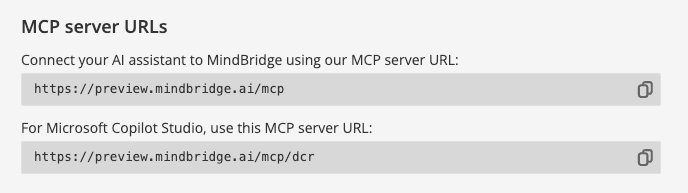
Copy the MCP server URL for your environment.
- In ChatGPT, Claude, Cursor, Microsoft Copilot, or another compatible assistant, open MCP or connector settings and add the copied URL.
- Sign in to MindBridge when prompted, using your normal sign-in process and your organization’s existing identity controls.
- Review the MindBridge consent screen and approve the permissions needed for your task. To use all available capabilities, grant both analysis metadata access and analysis result data access, described below.
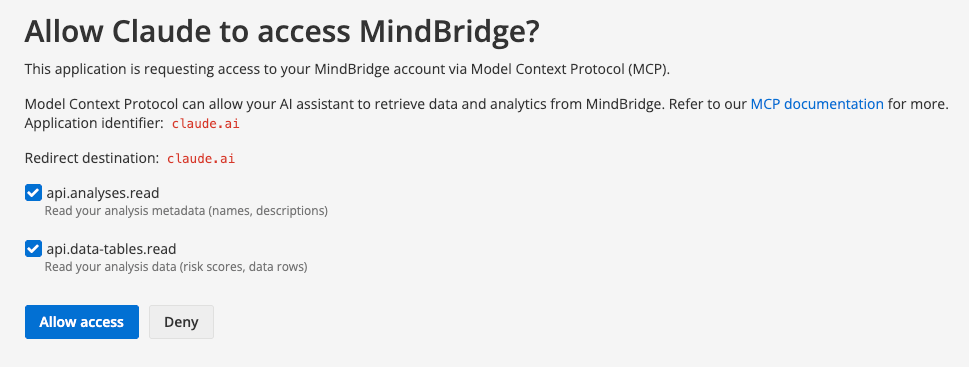
Adding the MindBridge MCP server in Claude.
Access and permissions
Every request runs with your MindBridge user permissions. The assistant can access only the analyses available to you in MindBridge. Removing or restricting your access in MindBridge also affects your MCP connection. The consent screen requests access through two read-only permissions:- Analysis metadata (
api.analyses.read): Find analyses, describe their structure, and explain control points. - Analysis result data (
api.data-tables.read): Query specific result rows or aggregates.