

Prerequisites
You must be an App Admin to access the API page within the MindBridge application.How does an API work?
An API allows an application to communicate with the MindBridge app through a set of clearly defined commands, enabling secure access to enterprise assets and processes using a REST interface. As displayed in the image below, using an API is similar to placing an order at a restaurant. Think of API commands as ordering off a restaurant menu — the menu defines a list of available “dishes” (like programs or functions), and when you place an order, the kitchen (like the server or database) prepares the food (like the request) in the back, then sends it out to you when it is ready. In brief, APIs define a list of commands. When an ERP uses one of those commands, MindBridge sends back what was requested.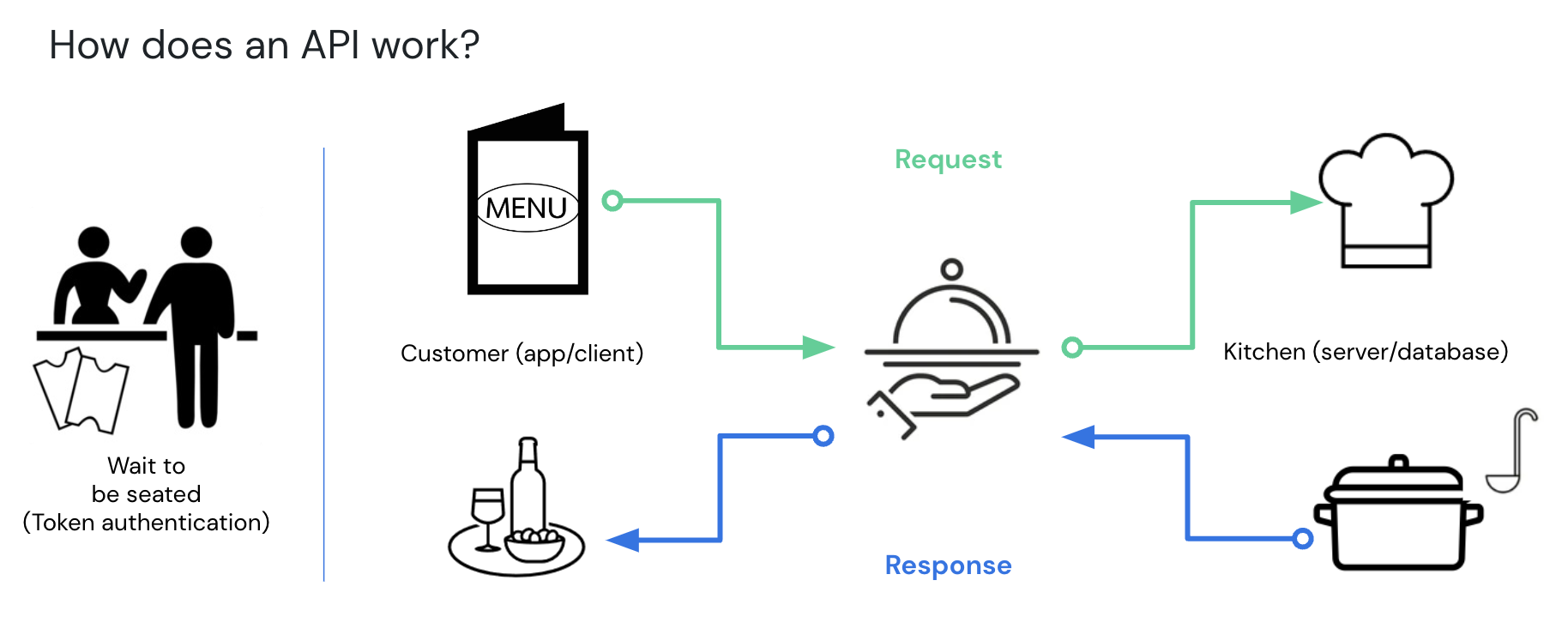
What is a REST architecture?
MindBridge uses a RESTful API architecture, which allows computer systems to exchange information securely over the internet utilizing HTTPS. Requests made via a RESTful API are stateless, and each request contains all of the data necessary to complete the request successfully.What are the benefits of using an API?
- Scalable data ingestion and exporting results using automation
- A unified data analysis platform, regardless of industry or organization needs
- Secure and controlled access to MindBridge’s data which creates new opportunities for analysis and insights at scale
- The automation of complex, repeatable tasks
What is a MindBridge API token?
A MindBridge API token is a string of characters that acts as a key to the API, and is implemented as an authentication bearer token. It is utilized by adding the token to the header of each HTTPS request. This token type is a cryptographically secure authentication token that includes the configured permissions allowing API clients to access MindBridge API resources or “endpoints”.What is an endpoint?
Endpoints are exposed functions of an application API with functionality provided by HTTPS methods.What is an HTTPS method?
An HTTPS method represents functionality supported by the HTTPS protocol, such as GET, POST, PUT, PATCH, and DELETE. These methods essentially allow you to read, write, or delete libraries, organizations, engagements, analyses, users, and much more.How long do API tokens last?
The token life cycle is configurable by the App Admin for any period of time, up to a maximum of 2 years.What happens if my API token is compromised?
Tokens must be stored in a secure location, and should never be shared. The security of your token is paramount. If a token is compromised, the App Admin should disable and re-issue the token immediately.How are API tokens generated?
An App Admin creates API tokens in the Admin section of the app, where they can apply lifecycle and permissions to each token.Who can access and use the API?
Anyone who has a valid token is able to use the API. App Admins are responsible for managing API tokens, and can grant API access to any users within the engagement.How do I use the API?
To use the API:- An API token must be generated by an App Admin within MindBridge.
- Once you have access to the API token, use the HTTPS protocol to make a request to a documented endpoint in the MindBridge API. Requests can be made using a variety of tools, including most programming languages.